
Equipment readiness
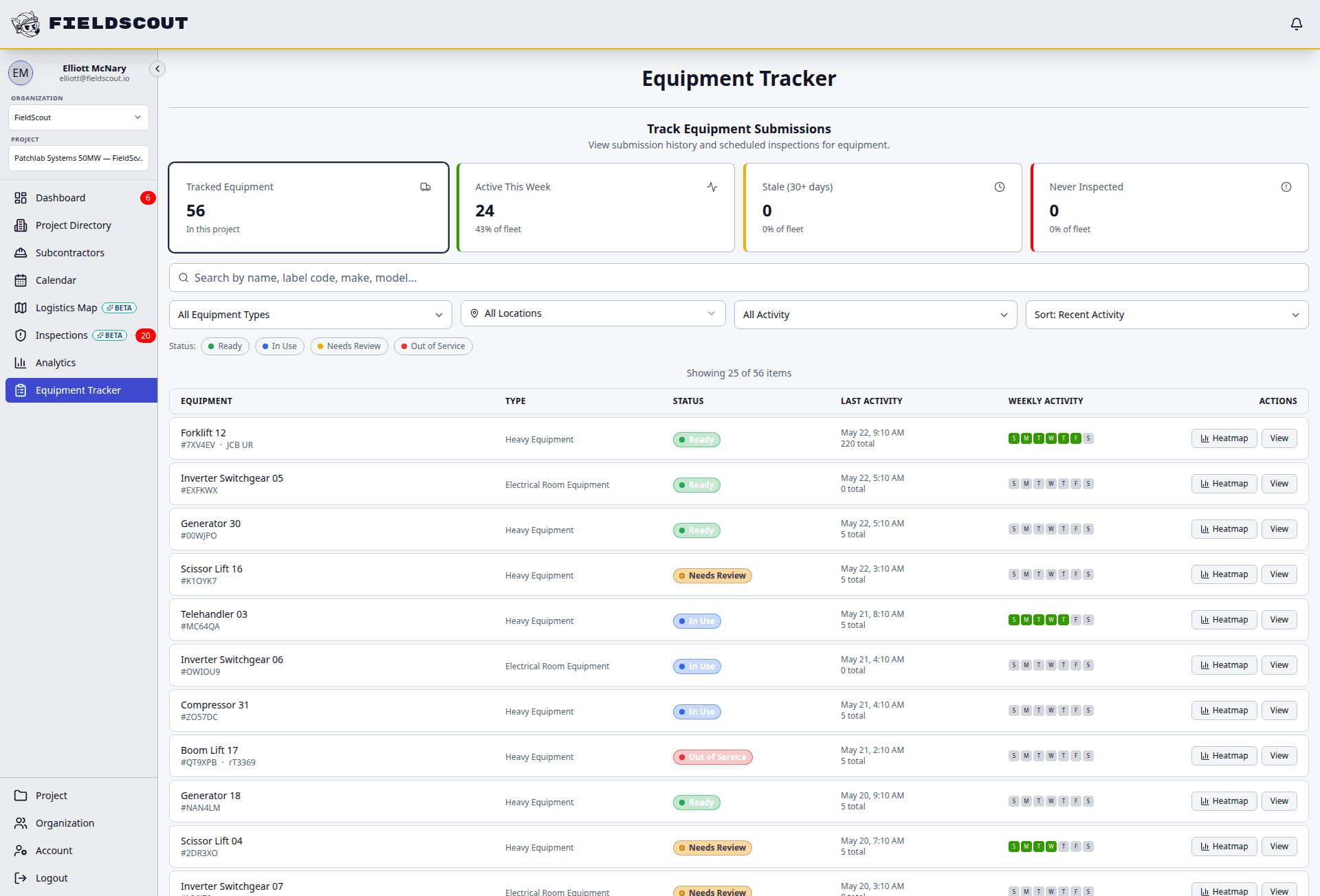
Know which equipment is ready, blocked, inspected, and sealed
FieldScout tracks installed and site-critical equipment from delivery through inspection, sealing, issue resolution, readiness, and turnover.



Direct answer
What is construction equipment readiness software?
Construction equipment readiness software tracks whether critical jobsite assets are delivered, inspected, sealed, approved, blocked, overdue, ready, or turned over. FieldScout is built for installed and site-critical equipment, not fleet rental maintenance.
Why delivered does not mean ready
Spreadsheets show a static status but rarely prove the latest field condition.
Inspection history is hard to find when each form, photo, and issue lives somewhere else.
Tamper seal status, permit dependencies, and readiness blockers are tracked separately.
Turnover packages require manual reconstruction from emails, binders, and memory.
Not fleet maintenance software
FieldScout tracks the readiness of equipment that affects construction execution and turnover: PDUs, UPS units, switchgear, panels, generators, HVAC assets, fire/life-safety systems, temporary systems, and other critical MEP equipment.
Workflow
Track equipment status from delivery to turnover
FieldScout turns field coordination into a repeatable sequence with status, ownership, and audit history attached.
Register critical assets with QR codes, location, owner, trade, and status.
Capture delivery, acceptance, damage, and inspection records as equipment arrives.
Apply tamper seals and log every break, replacement, and follow-up action.
Connect permits, issues, blockers, and approvals to the equipment record.
Move assets through readiness status and export a complete audit history for turnover.
Modules
Readiness workflows for critical jobsite assets
Each module is built for field teams that need fast entry, clear status, and reliable records.
QR registry
Give each asset a scannable record with location, trade, status, and history.
Inspection forms
Capture acceptance, safety, quality, and readiness checks from the field.
Tamper seal history
Record seal application, breaks, replacements, and chain-of-custody.
Permit dependency
Show when high-risk work or access permits affect equipment readiness.
Issue tracking
Capture damage, missing documentation, failed checks, and unresolved blockers.
Readiness dashboard
See which assets are ordered, delivered, inspected, sealed, blocked, ready, or turned over.
Exportable records
Prepare audit and turnover history without rebuilding it manually.
MEP context
Connect readiness to deliveries, zones, permits, inspections, and trade activity.
Field example
A readiness status model the field can understand
FieldScout helps teams make status explicit, so ready means more than arrived.
Compare
FieldScout vs fleet and rental equipment software
| Workflow | FieldScout | Fleet or rental tools |
|---|---|---|
| Asset type | Tracks installed and site-critical MEP equipment readiness. | Fleet tools focus on owned equipment maintenance, utilization, and rental logistics. |
| Field workflows | Connects QR scans, inspections, permits, tamper seals, issues, and readiness status. | Fleet tools may not understand construction turnover, permit, or seal workflows. |
| Audit trail | Stores per-asset history from delivery through turnover. | Maintenance logs do not usually capture jobsite acceptance and readiness decisions. |
| MEP fit | Supports PDUs, UPS units, switchgear, panels, generators, HVAC, and life-safety systems. | Rental systems are built around equipment inventory and billing. |
FAQ
Common questions
What equipment can FieldScout track?
FieldScout can track critical MEP and jobsite assets such as panels, switchgear, generators, HVAC equipment, PDUs, UPS units, fire/life-safety systems, temporary systems, tools, and other project-defined assets.
Can equipment be scanned with QR codes?
Yes. QR labels can open the equipment record, inspection workflow, permit, tamper seal action, issue report, or status check in the browser.
Can FieldScout track tamper seals?
Yes. FieldScout includes digital tamper seal workflows for seal application, break, replacement, and chain-of-custody history.
Can records be used for turnover?
Yes. The goal is to keep equipment history export-ready so teams can support owner, GC, inspector, or commissioning handoff requests.
Related FieldScout pages
Keep exploring the connected workflows
Get a walkthrough
See equipment readiness in FieldScout
Review how QR records, inspections, permits, tamper seals, issues, and turnover history connect around critical assets.