
Jobsite logistics
Construction site logistics software for safer field operations
FieldScout connects logistics maps, delivery windows, work zones, permits, inspections, and MEP readiness so site teams can coordinate the day without chasing whiteboards, PDFs, texts, and stale spreadsheets.



Direct answer
What is construction site logistics software?
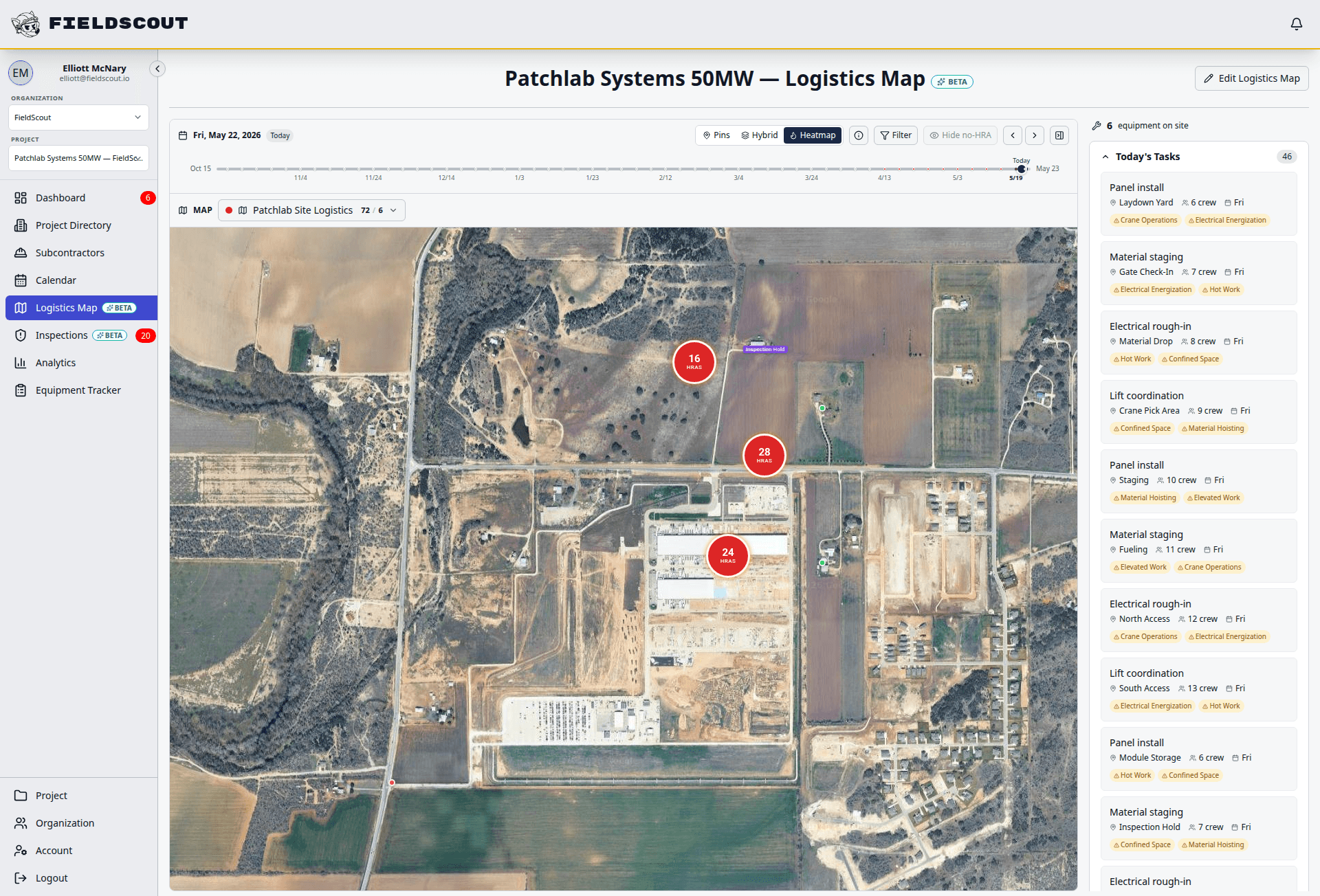
Construction site logistics software helps project teams plan and coordinate how people, materials, equipment, deliveries, gates, routes, laydown areas, and high-risk zones move through a jobsite. FieldScout adds the safety, permit, inspection, and equipment readiness context that static logistics plans usually miss.
Where static plans break down
Whiteboards and PDF logistics plans stop matching the site once gates, routes, or crews change.
Texts and calls create delivery decisions that are hard to find during a delay, incident, or audit.
Double-booked laydown zones and unclear routes slow trades before work even starts.
Permits, inspections, and MEP readiness are often managed outside the logistics plan.
Workflow
Plan, coordinate, and document jobsite movement
FieldScout turns field coordination into a repeatable sequence with status, ownership, and audit history attached.
Plan the site around current access points, gates, routes, laydown zones, and restricted areas.
Define delivery windows and assign the route, gate, offload area, and responsible trade.
Attach permit, inspection, or equipment readiness requirements to the relevant zone or delivery.
Notify crews and vendors with the instructions they need before they arrive.
Keep a searchable audit trail of changes, approvals, arrivals, and field follow-up.
Modules
Jobsite logistics modules
Each module is built for field teams that need fast entry, clear status, and reliable records.
Logistics maps
Make gates, routes, zones, laydown areas, and high-risk spaces visible to the field team.
Gates and routes
Route deliveries and crews through approved access points with instructions tied to each activity.
Loading zones
Coordinate loading, unloading, staging, and laydown zones before congestion hits the site.
Delivery scheduling
Put approved delivery windows on the project operations calendar and keep changes visible.
Restricted zones
Mark high-risk, access-controlled, or temporarily blocked areas so trades know before they move.
MEP readiness
Tie logistics decisions to equipment status, inspection needs, and critical MEP workflows.
Permit tie-ins
Connect hot work, access, equipment, or custom permits to the location and activity they govern.
Audit history
Track who changed what, when delivery windows moved, and what field checks were completed.
Field example
Data center logistics with safety context
Mission critical jobsites need logistics plans that understand security, access, equipment value, and MEP readiness. FieldScout helps teams coordinate delivery and movement for critical systems while preserving the record owners expect.
Compare
FieldScout vs spreadsheets and static logistics plans
| Workflow | FieldScout | Spreadsheets or PDFs |
|---|---|---|
| Site changes | Updates routes, zones, deliveries, and follow-up records in one browser-based workspace. | Changes scatter across files, texts, calls, and marked-up drawings. |
| Safety context | Connects logistics decisions to permits, inspections, high-risk zones, and equipment readiness. | Safety requirements usually live in a separate binder, app, or checklist. |
| MEP readiness | Shows whether critical equipment is delivered, inspected, sealed, blocked, or ready. | Delivered often gets treated as ready until someone discovers the gap in the field. |
| Audit trail | Keeps a timestamped history of requests, approvals, changes, and field activity. | Teams reconstruct decisions manually from emails and memory. |
FAQ
Common questions
Is FieldScout a CPM scheduling tool?
No. FieldScout does not replace Primavera, MS Project, or the master CPM schedule. It handles daily and weekly field operations: logistics, deliveries, zones, permits, inspections, and readiness.
Can trades request delivery windows?
Yes. Teams can capture delivery requests, review the slot, assign gate and route instructions, and keep the approved window visible on the operations calendar.
Can logistics be tied to permits and inspections?
Yes. Logistics records can carry the related permits, inspection forms, equipment records, and audit history so crews know what has to be checked before work starts.
Can workers use it without an app?
Yes. FieldScout runs in the browser, so workers and subcontractors can open workflows from a phone link or QR code without installing a mobile app.
How does this help MEP teams?
MEP teams can connect deliveries and work zones to equipment readiness, inspections, tamper seal status, permit requirements, and turnover records.
Related FieldScout pages
Keep exploring the connected workflows
Get a walkthrough
See how FieldScout coordinates safety and MEP operations
Walk through logistics maps, delivery windows, permits, inspections, and equipment readiness in one connected field operations workflow.