
MEP operations
MEP operations software for the work happening in the field
FieldScout is the field execution layer for mechanical, electrical, and plumbing teams that need equipment status, delivery coordination, inspections, permits, QR scans, tamper seals, and readiness history in one place.



Direct answer
What is MEP operations software?
MEP operations software helps field teams coordinate the execution work around mechanical, electrical, and plumbing systems. In FieldScout, that means tracking equipment records, readiness status, inspections, permits, deliveries, tamper seals, zones, and audit history without forcing crews into a complex desktop tool.
MEP field gaps FieldScout closes
Equipment arrives on site, but the team cannot tell whether it is inspected, blocked, sealed, or ready.
Inspection records, permit approvals, and seal status live in separate binders, apps, or spreadsheets.
Deliveries are disconnected from zones, access constraints, and the work that must happen next.
Electrical and mechanical work creates audit needs that are painful to reconstruct after the fact.
Built for field coordination, not BIM authoring
FieldScout does not replace BIM coordination, detailing, fabrication, or spooling systems. It sits closer to the jobsite: the place where crews scan equipment, confirm readiness, complete inspections, request permits, coordinate deliveries, and prove what happened.
Workflow
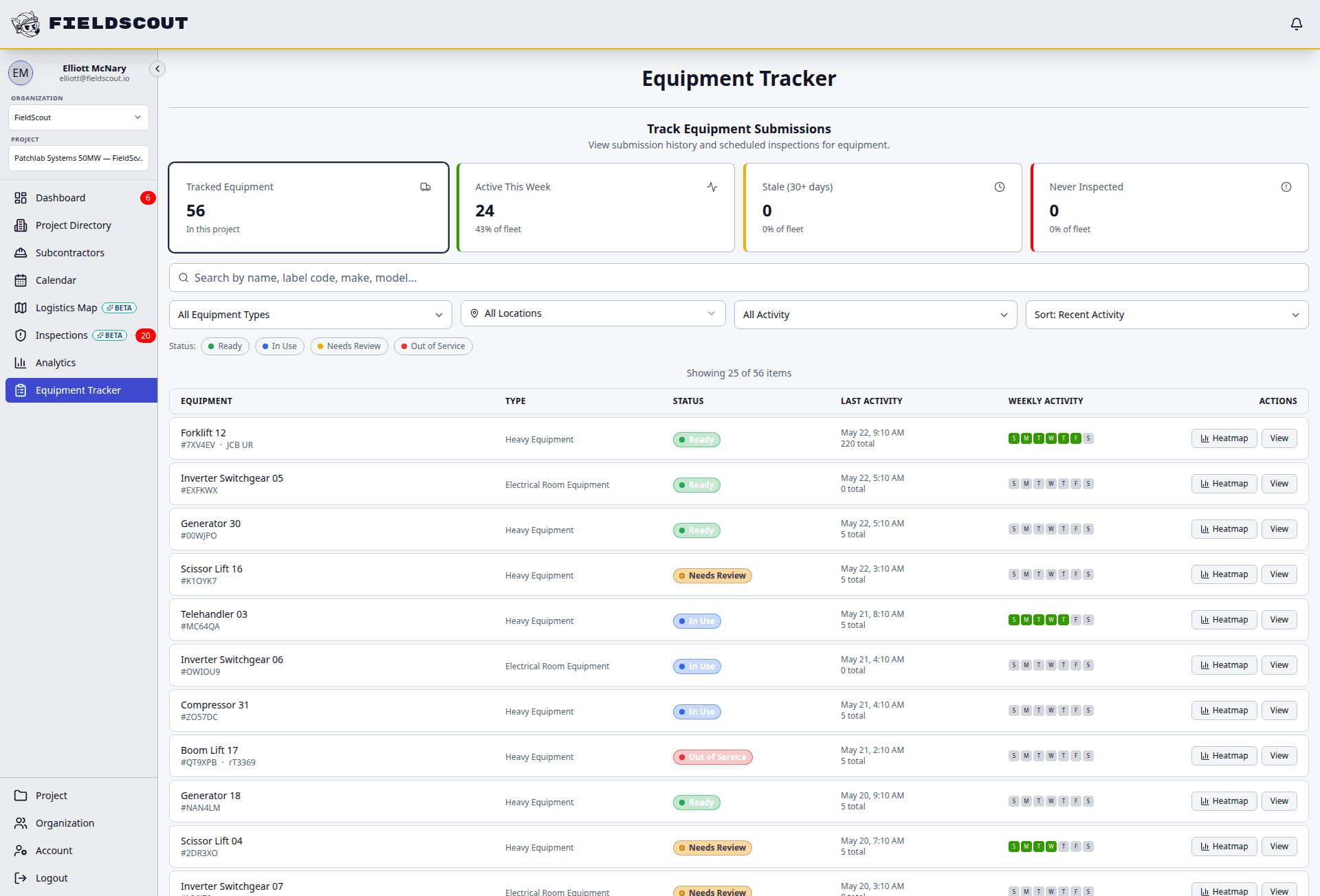
Coordinate MEP equipment, work, and status
FieldScout turns field coordination into a repeatable sequence with status, ownership, and audit history attached.
Create equipment records for panels, switchgear, generators, HVAC assets, PDUs, UPS units, and other critical systems.
Attach QR labels so crews can open the correct record, inspection, permit, or seal workflow from the field.
Coordinate delivery windows, gates, routes, and zones around MEP work areas.
Complete inspections, permit reviews, and readiness checks as the work progresses.
Preserve a turnover-ready record of status, issues, seals, approvals, and field history.
Modules
MEP field operations workflows
Each module is built for field teams that need fast entry, clear status, and reliable records.
Equipment registry
Track MEP equipment records with location, ownership, status, QR access, and history.
QR inspections
Let crews scan equipment and complete the right inspection or checklist from a phone browser.
Tamper seals
Track seal application, break, replacement, and chain-of-custody history for critical assets.
Delivery coordination
Connect delivery windows and logistics instructions to equipment and work zones.
Project calendar
Keep inspections, permit windows, deliveries, and readiness milestones visible to field leaders.
Permit workflows
Route high-risk work permits through request, review, approval, field verification, and closeout.
Issue tracking
Capture blockers, missing documentation, failed inspections, and readiness risks where they occur.
Data centers
Support data center equipment workflows for electrical, mechanical, cooling, and life-safety systems.
Field example
Role-based clarity for MEP work
FieldScout gives each project role the same status record without forcing everyone into the same dashboard view.
Compare
Where FieldScout fits with Procore, BIM, and scheduling tools
| Workflow | FieldScout | Adjacent systems |
|---|---|---|
| Project management | Captures field operations workflows around equipment, readiness, permits, inspections, and logistics. | Project management platforms often hold broader project records but may not handle the field detail. |
| BIM coordination | Uses the field record for status, scans, inspections, and audit trails. | BIM tools coordinate model design, clashes, and fabrication detail. |
| Scheduling | Shows daily and weekly operations activity tied to field execution. | CPM tools manage the master schedule and critical path logic. |
| Field adoption | Runs in the browser from a link or QR code, with no worker app download. | Some systems require app installs, licenses, or office-led entry. |
FAQ
Common questions
Does FieldScout replace Procore?
No. FieldScout can sit alongside project management systems. It focuses on field execution workflows like QR equipment records, inspections, permits, tamper seals, readiness, and logistics coordination.
Does FieldScout handle BIM coordination?
No. FieldScout is not BIM authoring or clash detection software. It helps teams manage what happens after the coordinated work reaches the field.
Does it work for electrical and mechanical teams?
Yes. FieldScout can support electrical, mechanical, plumbing, cooling, fire/life-safety, and temporary systems workflows through configurable equipment records, forms, permits, and status tracking.
Can field crews use it without installing an app?
Yes. Crews can open FieldScout in a phone browser from a QR code or shared link, which helps with rotating subcontractor teams.
Related FieldScout pages
Keep exploring the connected workflows
Get a walkthrough
Walk through MEP operations in FieldScout
See how equipment records, QR scans, inspections, permits, deliveries, and tamper seal history work together for field teams.